Pairs by code
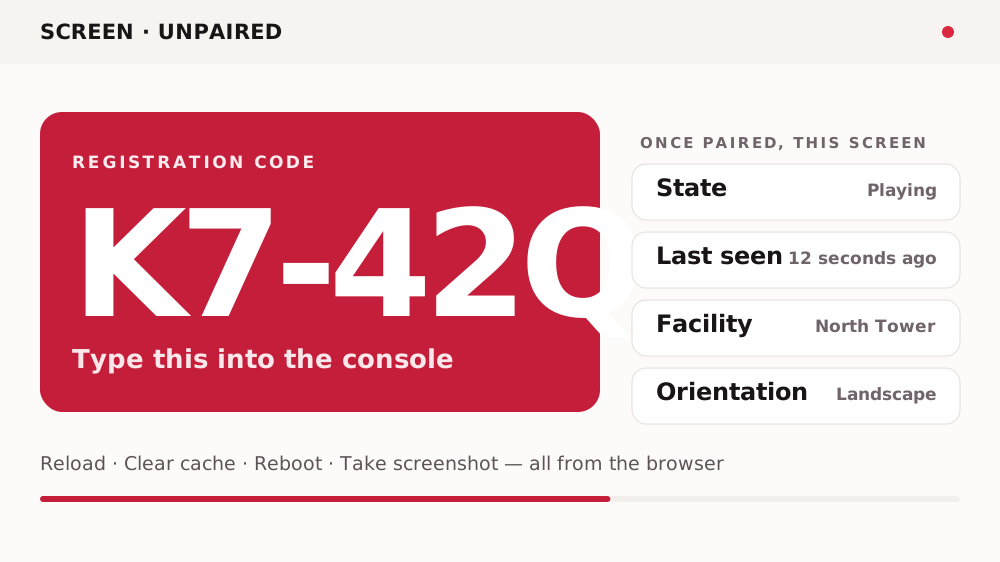
The screen shows a registration code. You type it into the console once.
The player
Our competitor lists fourteen player platforms. We have one, and padding the list out would be the most obvious lie on this site. So here is what the one does, in detail — including the part where it can show you a photograph of what it is really displaying.
It installs on displays you already own.
What it does
Every one of these is a control in the console that acts on a screen somewhere else. None of them needs anybody to visit the screen.
The screen shows a registration code. You type it into the console once.
Reload, clear the cache, or clear its data — from a browser, from anywhere.
The instruction nobody wants to give over the phone to a shift manager.
The one that matters. Not what the screen was told to show — what it is showing.
Playing, Online (Idle), Offline or Paused, with a last-seen time against each.
When nothing is scheduled it plays its default composition rather than going dark.
Portrait or landscape, set on the device profile along with its position and size.
So a fleet can be filtered rather than scrolled.
Display sizing
Standard panel resolutions, so a layout is built once at the right pixel dimensions rather than scaled up on the wall. Portrait is the same figures with the axes swapped.
| Name | Landscape | Portrait | Aspect | Typical use |
|---|---|---|---|---|
| HD | 1280 × 720 | 720 × 1280 | 16:9 | Small panels and older screens |
| Full HD | 1920 × 1080 | 1080 × 1920 | 16:9 | The default — most signage panels |
| 4K UHD | 3840 × 2160 | 2160 × 3840 | 16:9 | Large-format and close-viewing panels |
| Ultra-wide | 3840 × 1080 | 1080 × 3840 | 32:9 | Stretched panels above counters and shelves |
| Video wall 2 × 2 | 3840 × 2160 | 2160 × 3840 | 16:9 | Four Full HD panels driven as one canvas |
The complete stack
Named against the product's own modules. Where a layer has not been established, it says so rather than being filled in.
| Layer | What it is | Where it runs | Who runs it |
|---|---|---|---|
| Console | Web application — create, schedule and monitor | Browser, at an app subdomain | ScreenQube |
| Player | Android app that pulls and plays the schedule | On the screens you own | You |
| Screens | The panels themselves, plus mounts and cabling | Your sites | You, or your partner |
| Content | Media, apps and Composition templates | Console, played on the screen | You |
| Plans & billing | Plans built by a partner, reconciled through Stripe | Console, Stripe behind it | Your partner |
| Support | First line on faults and account questions | — | Your partner, then us |
| Hosting topology | Whether a private installation is offered has not been established | Unconfirmed | Unconfirmed |
Questions
Android. That is the whole list, and it is why this page is one page rather than fourteen. If your screens are driven by iPads or Apple TV, this is not the right product today.
It shows a registration code. You type that code into the console once, and the screen belongs to a facility from then on.
Reload it, clear its cache, clear its data, reboot it, change its status, swap it for a replacement — and take a screenshot of what it is actually displaying.
Its default composition. That is a real setting, not a black screen.
Ask us and the product team will confirm it for your setup. What we can tell you is that the player holds a local cache — the console can clear it — so the mechanism for offline playback exists. Whether playback continues without a network is a question for the product team, and it is the most common one asked in this category.
No certified hardware list has been published. Ask us before buying a fleet rather than after.
Where it ends up
Portrait, landscape, a window, a concourse — the player does not care which, so long as the display runs Android.
If they run Android, the player installs on them. If they do not, we will tell you now.