Pricing
The right plan for
every screen you run.
One screen or a thousand — the same console, the same Android player. The cards below are the plans your partner has published, at the price and in the currency they set.
Prices shown in USD converted at an indicative rate
Partner
For agencies and integrators selling signage under their own brand.
- Build your own plans
- Set your price and currency
- Your sub-domain and logo
- Stripe billing built in
- Impersonate client consoles
- Shared media repository
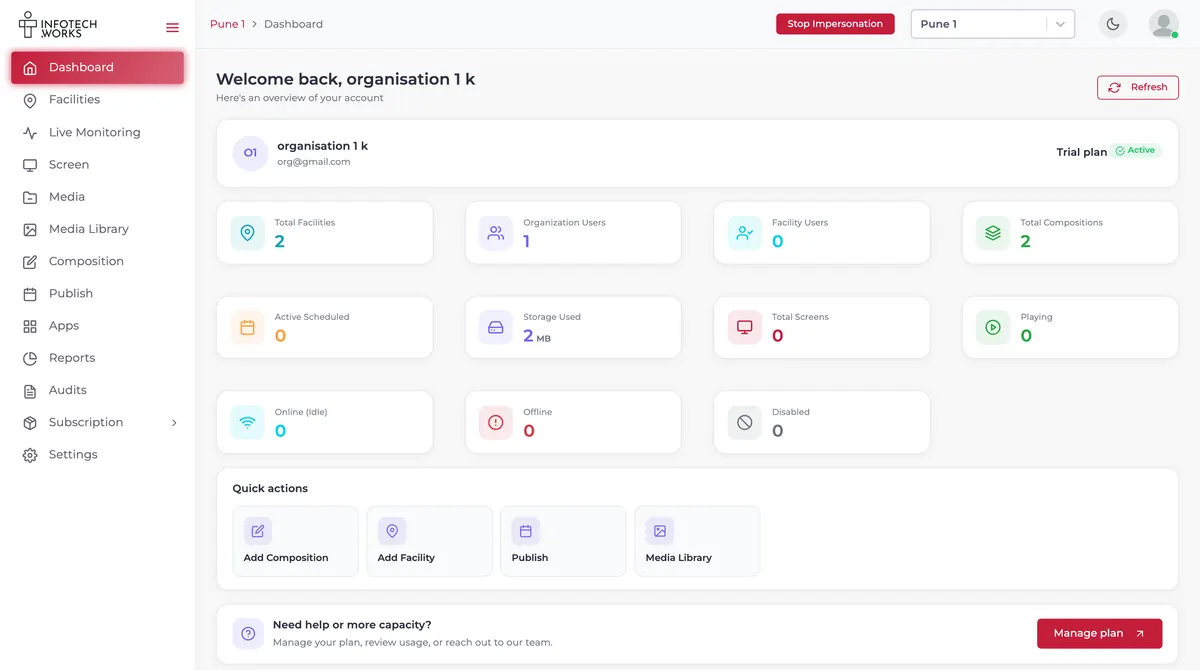
Why ScreenQube
Why ScreenQube for
your screens.
- No cut-down edition. Monitoring, remote control and uptime reports are on every plan.
- Priced in your market. Quoted in your currency by a partner who sells where you are.
- Limits you can see. Storage and caps are shown in the console, named when you reach them.
- Billing you control. Payment methods, plan changes and cancellation, all self-serve.
- No certification claimed. We hold no SOC 2 or ISO 27001 — better you read it here than in procurement.
| Compare plans | Standard | Enterprise | Partner |
|---|---|---|---|
| General | |||
| Facilities | Included | Included | Included |
| Media library and folders | Included | Included | Included |
| Compositions and templates | Included | Included | Included |
| Scheduling and QuickPlay | Included | Included | Included |
| Content calendar | Included | Included | Included |
| App Store | Included | Included | Included |
| Office document embedding | Included | Included | Included |
| Monitoring and control | |||
| Live monitoring | Included | Included | Included |
| Remote screenshot | Included | Included | Included |
| Remote reboot and cache control | Included | Included | Included |
| Screen pairing by code | Included | Included | Included |
| Uptime and media reports | Included | Included | Included |
| Audit logs | Included | Included | Included |
| Groups, roles and permissions | Included | Included | Included |
| Multi-language console | Included | Included | Included |
| Plan limits | |||
| Screens | Per plan | Per plan | You set |
| Media items | Per plan | Per plan | You set |
| Compositions | Per plan | Per plan | You set |
| Storage | Per plan | Per plan | You set |
| Users | Per plan | Per plan | You set |
| Free trial | Optional | Optional | You set |
| Billing period | Monthly / yearly | Monthly / yearly | You set |
Inside a plan
What your partner
filled in.
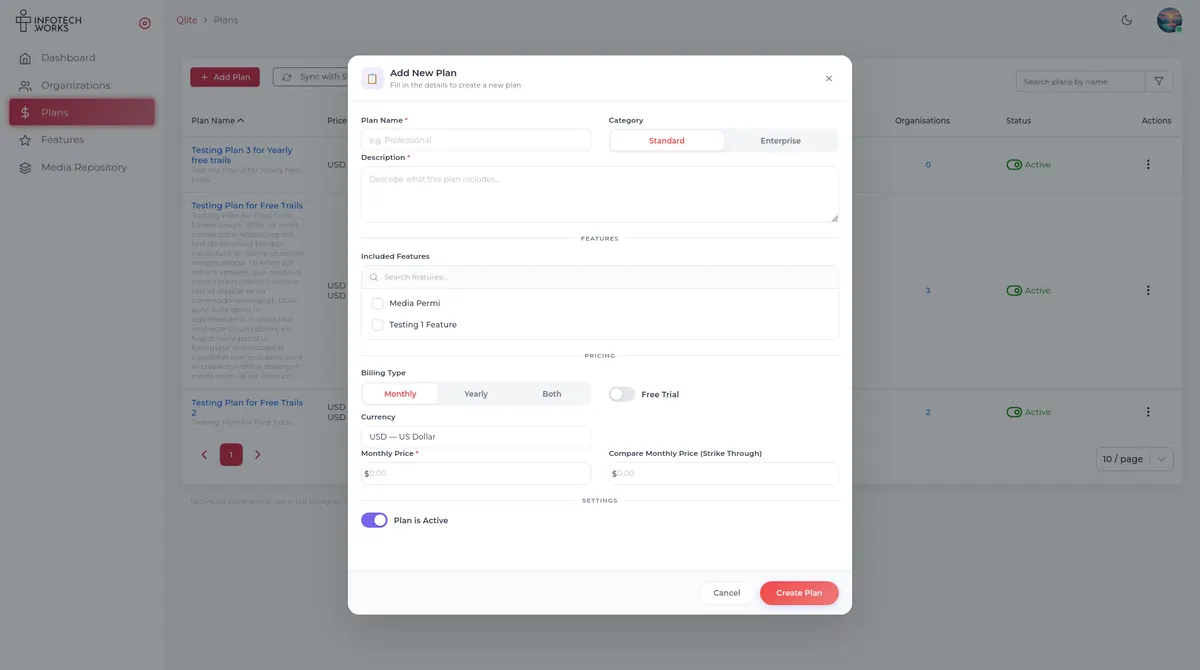
This is the actual plan builder. When a quote arrives, these are the fields behind it — worth knowing before you compare two of them.
- Category — Standard or Enterprise
- Included features — chosen from the partner's own list
- Billing type — monthly, yearly, or both
- Currency and monthly price, plus an optional struck-through compare price
- Free trial — on or off, per plan
Before you sign
Six questions that make
two quotes comparable.
How many screens does this cover?
The cap is an access rule on a feature, not a tier. Get the number in writing.
How much storage, and what happens at the limit?
The console warns before it stops you. Ask what going over costs.
How many users, and can they have roles?
Roles and per-resource permissions exist. A user cap is still a plan limit.
Is there a trial, and how long?
A per-plan toggle. The length is theirs to set, so get it in writing.
Monthly or yearly — and what does yearly save?
Both are supported per plan. Any discount is the partner's to offer.
Who do I call when a screen goes dark?
Support sits with your partner. Ask their hours and response time.
Get a real number.
Tell us how many screens you run and where they are, and we will put you in front of the partner who covers you. Bring the six questions.
Prefer to sell it yourself? Become a partner.
Questions
Pricing questions, answered.
Are those figures what I will actually pay?
Yes — each card is a plan your partner has published, at the price and in the currency they set. If your device is somewhere that uses a different currency we convert the figure for you and label it on the card; that conversion is indicative, and your partner still invoices in their own currency. Tax depends on where you are and is never included. The table below is the part that never varies: it tells you precisely what you get.
Is it priced per screen or per user?
Whichever your partner chooses. The plan builder carries a monthly price for the plan, and the plan carries access rules capping screens, media, compositions, storage and users. Two partners can shape the same platform very differently.
Do I get fewer features on a cheaper plan?
Not fewer modules — the console is the same, which is what the block of ticks above shows. What a cheaper plan changes is the caps: fewer screens, less storage, fewer users. Your partner can also leave a feature off a plan, so ask which rows are on yours.
How do I find a partner?
Ask us and we will point you at the one covering your region.
Is there a free trial?
Plans can carry one, and your console shows the countdown while it runs. Whether a particular plan includes a trial, and for how long, is your partner's decision.
How is it billed, and can I cancel?
Through Stripe — plans created by a partner are pushed to Stripe as products and reconciled in the background. Payment methods, your current plan and Cancel Subscription all live in your own console.
Can I buy directly from ScreenQube?
No. The platform is multi-tenant so partners can run their own catalogue, pricing and branding on it — selling around them would undercut the people who onboard and support you.
Do you hold SOC 2 or ISO 27001?
No. Competitors in this category advertise both; we hold neither today and will not imply otherwise. Audits, groups, roles and per-resource permissions are in the product — a certification is not.